Teneo Protocol Airdrop Review + 100 Requests Guide
Eligibility checklist, task flow, and safe-link verification for this campaign.
Install "Listen to Article" to read this page out loud in Chrome.
Prefer not to install? Use your browser's built-in Read Aloud if available.
Do this now: install the mandatory Teneo extension, connect your wallet, then grind 100 Agent Requests and claim your points immediately. This is one of the most efficient “time vs. reward” quests we’ve tested because the requests are quick to spam and only require a tiny amount of USDC to cover micro-costs.
This airdrop guide was reviewed by the AirdropBuzz research team, who have completed dozens of Solana and DeFi airdrops.

I'm Dhiraj Dixit, founder of AirdropBuzz. I personally research and complete airdrops before publishing these guides.
Airdrop quick facts
What does this score mean? See the scoring methodology.
Step-by-Step Carousel
Swipe through steps quickly: Step 1, Step 2, Step 3 and more.
https://dashboard.teneo.pro
| Time Required | Cost | Risk Level | Our Verdict |
|---|---|---|---|
| 10–20 mins | ~$0.20–$0.50 USDC | Medium-Low | Must-do quest for Teneo Points farmers: fast, cheap, and clearly milestone-based in the dashboard. |
| UX Score (/10) | Earning Potential (High/Med/Low) | Reward Certainty (Confirmed/Speculative) |
|---|---|---|
| 8.2 | Med | Speculative |
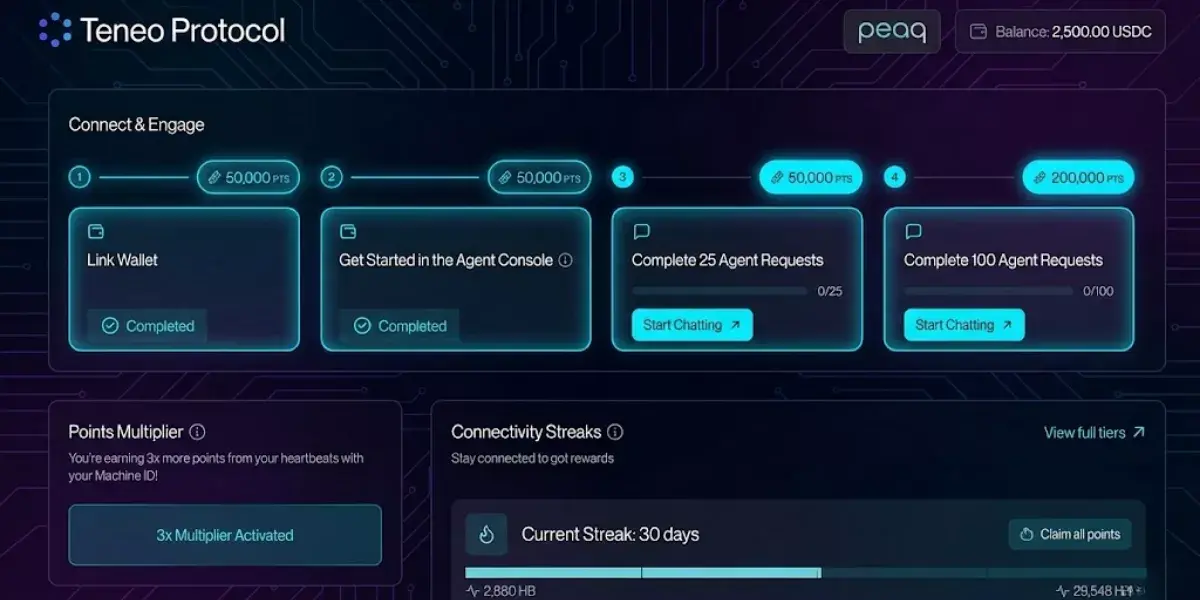
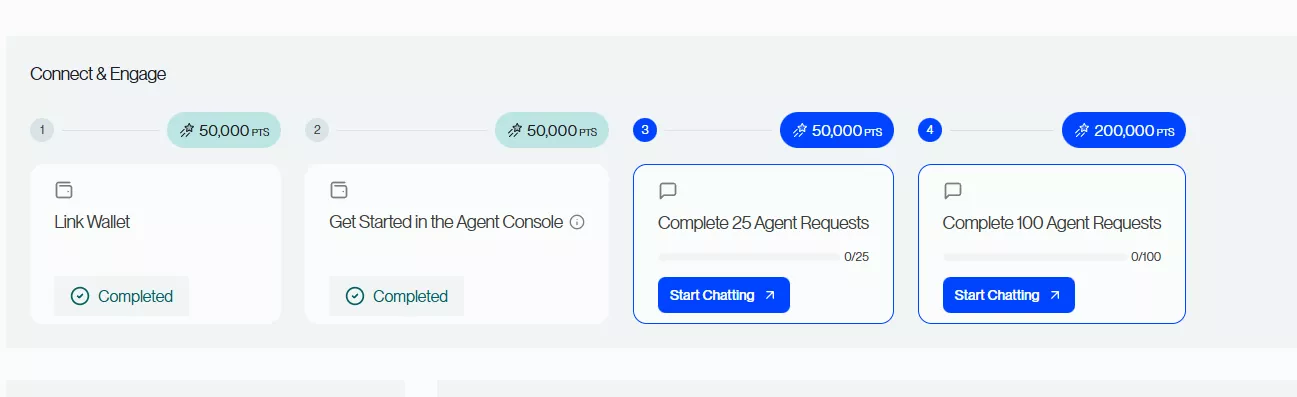
Points note (validated in-app): In the current Connect & Engage panel, Complete 100 Agent Requests shows 200,000 PTS, and there’s a separate 25 Agent Requests milestone worth 50,000 PTS. Completing the full visible panel (Link Wallet + Agent Console + 25 Requests + 100 Requests) totals 350,000 PTS.
What is Teneo Protocol?
Teneo Protocol is a decentralized network where users run a browser-based Community Node and interact with AI Agents through an onchain micropayment console, earning points for participation. The core flow is simple: the Dashboard tracks quests and progress, while the Agent Console is where you send paid Agent Requests (often using a session-style key so you aren’t signing every click). For the Agent Console loop, you’ll typically need a small USDC balance on peaq so requests can execute without interruptions.
Our Experience Joining Teneo Protocol
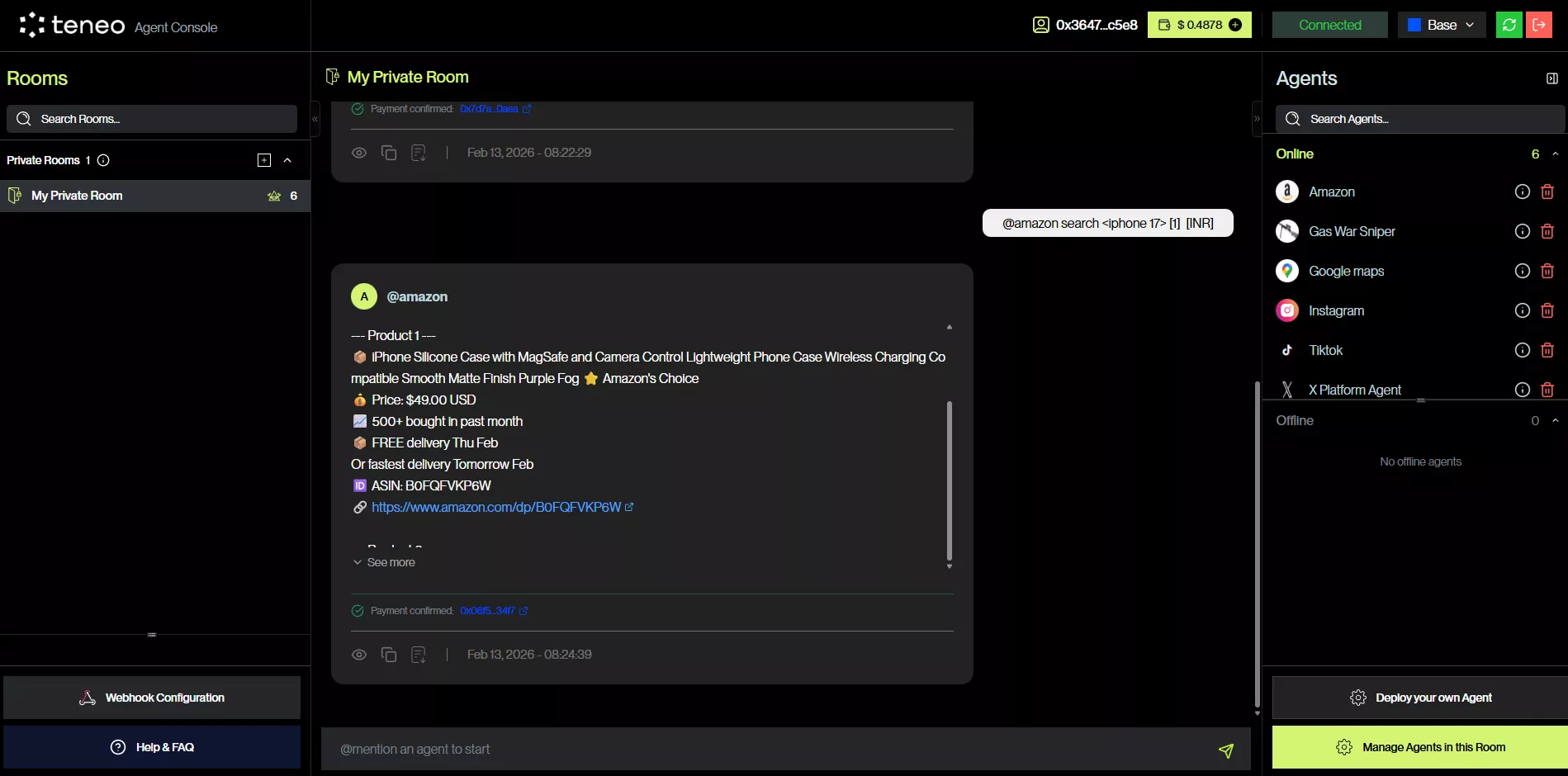
The AirdropBuzz Team completed this quest in one sitting. The flow is straightforward: install the Community Node extension, connect your wallet, open the Agent Console, fund a tiny USDC balance, then repeat the @-agent request loop until your counter hits 100. The only real friction is avoiding the classic mistakes: funding the wrong chain, choosing a pricey agent, and forgetting to claim right after completion.
Time vs Reward: Are Teneo Points Worth It?
This is a high-efficiency grind. If you already planned to participate in Teneo, the 100-request quest is one of the fastest ways to stack points with minimal capital. In our grind test, it took ~10–20 minutes depending on how fast we repeated the loop and how heavy the agent’s options were. The cost stayed low when we used a cheaper agent and kept actions simple.
- Points (validated in-app): 100 Agent Requests = 200,000 PTS (and 25 Requests = 50,000 PTS). The full visible Connect & Engage track totals 350,000 PTS.
- Fees vary by agent: don’t lock your expectations to a single per-request number. Always check what the Agent Console shows before you spam 100 requests.
- Reward outcome is speculative: Teneo Points are not confirmed tokens. Token name, TGE timing, and conversion are TBA. Treat this like a points program until proven otherwise.
Our verdict: worth doing if you’re already in the ecosystem. Just keep balances tiny, optimize for low-fee agents, and don’t “overfarm” at high cost chasing speculative points.
Risks & Things to Watch
- Extension permissions: browser extensions are powerful. Install only the official Teneo Community Node extension and review permissions carefully.
- Session keys / reduced prompts: the console may use session-style approvals to reduce wallet popups. That’s convenient, but it also means you should use a dedicated farming wallet and clean browser hygiene.
- Wrong-chain funding: the #1 newbie mistake is sending funds to the wrong chain or wrong token. Confirm you’re using USDC on peaq (as required by your console flow).
- Points can change: point programs get rebalanced. Always trust the dashboard values shown at the moment you complete/claim.
- Smart contract risk: any onchain interaction carries risk. Keep your funding small (you only need a tiny amount for this quest).
Step-by-Step Guide: How to Complete 100 Agent Requests (peaq)
Spam method that works: do it in batches of 25 × 4. Keep a counter (notes app or simple tally) so you don’t stop at 97 and wonder why it didn’t complete.
DYOR reminder: points are speculative until Teneo confirms token conversion details. Don’t overspend for points, and keep your wallet security tight.
Ready to complete the 100 Agent Requests? Start from the official dashboard and follow the quest order.
Referral Disclosure: We may earn points if you use our link.
FAQ: Teneo 100 Agent Requests on peaq
Is completing 100 Agent Requests free?
No. You usually need a small amount of USDC on peaq to cover per-request micro-payments. Total cost varies by agent pricing and network conditions.
Do I really need the new Teneo extension?
Yes. The Community Node extension is part of the current onboarding and rewards flow, and Teneo notes the system is in beta with changing features and reward numbers.
Do I definitely get 300,000 points for the 100 requests?
Not guaranteed. Point values can change. Treat whatever your dashboard shows at the time you complete and claim the quest as the correct number.
When is the snapshot or TGE?
TBA. Teneo Points are not confirmed tokens yet. Don’t overextend spending for points.
Why do I need a Session Key?
The Session Key is used to reduce repeated wallet prompts while you run many small Agent Requests. Use a dedicated wallet and reset/revoke keys if you suspect any security issues.
Direct link to official project page
Get curated airdrop updates
Weekly AirdropBuzz highlights, safety notes, and top picks-no spam.
Explore Airdrop Lists
Community Discussion & Rating
Leave a Comment & Rate
No comments yet. Be the first to share your thoughts!