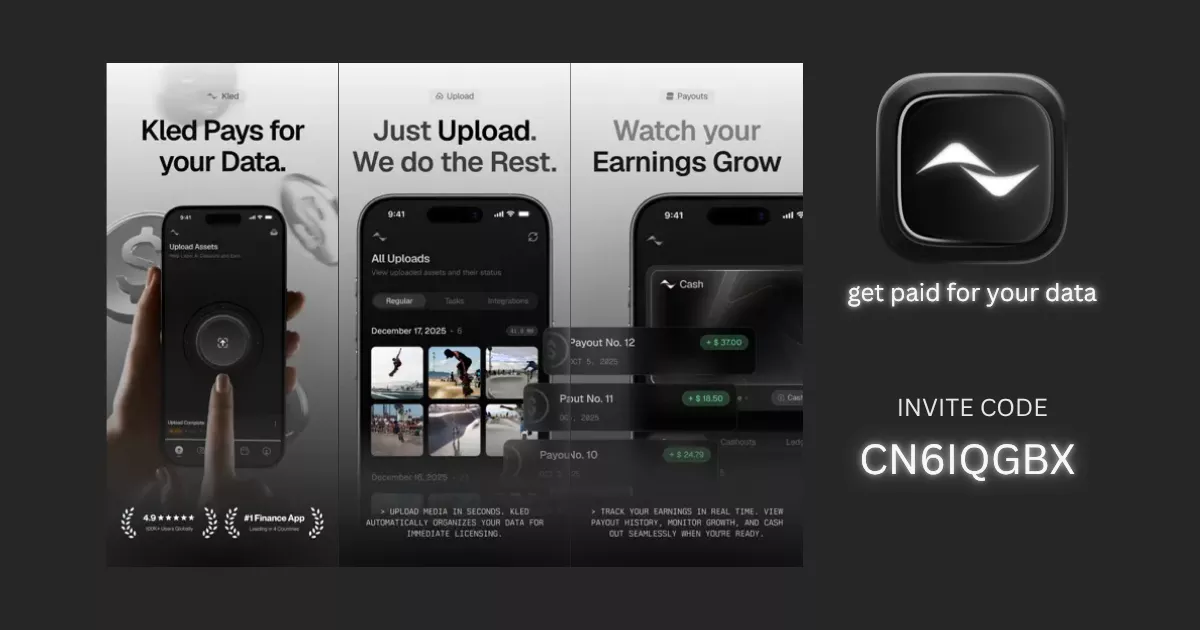
Kled is one of the more interesting iPhone-only “get paid for your data” apps right now. You upload original photos, videos, and task-based data, build an in-app USD balance, and can cash out once you hit $25. There is also a live $KLED token angle through in-app swap notices, but we have not found an official airdrop announcement yet. So the smart play is simple: treat cash payouts as the base case and any future token upside as extra.
| Verdict | Our take |
|---|---|
| Best use case | Good for iPhone users with a large camera roll or time for special tasks. |
| Main upside | Real USD cashouts are already part of the app, so this is not just a token bet. |
| $KLED angle | The app has live $KLED features and official swap notices, but a formal airdrop is still TBA. |
| Biggest catch | You are trading private media and data access for rewards, so privacy is the real cost. |
| Bottom line | Worth a look if you want a free iPhone-side hustle and you are comfortable with the data trade-off. |
| Test area | Score | Why |
|---|---|---|
| Setup speed | 8/10 | Download, sign in, and upload flow look simple. |
| Cost to start | 10/10 | No upfront spend is required. |
| Payout clarity | 7/10 | USD cashout options are clear, but earnings per upload can vary. |
| Privacy comfort | 4/10 | You are sharing media and personal data for AI training use. |
| Airdrop upside | 5/10 | $KLED is live, but no official airdrop has been confirmed. |
| Overall | 6.8/10 | Solid as a cash-first app, weaker as a pure airdrop farm. |
What is Kled?
Kled is an iPhone app that pays users in USD for uploading original photos, videos, and other approved data that can be licensed for AI training. In simple terms, you share content you already own, Kled reviews and packages that data, and you earn when your uploads or tasks qualify. The App Store listing shows cashouts to PayPal, Venmo, or a Solana wallet, which is a crypto app that stores tokens. Kled also has live $KLED token features, and official posts show in-app swap notices for active payouts. A token is a digital asset on a blockchain. Founder verification is strong enough for a first-pass review: Kled’s official pages tie the app to Nitrility Inc., and Avi Patel publicly identifies himself as founder of Kled and Nitrility on X, while LinkedIn also shows him as Founder. We did not find an official Kled post announcing a dedicated $KLED airdrop, which means any future snapshot is still TBA.
Our Experience Joining Kled
The AirdropBuzz Team’s read on Kled is simple: this feels more like a real product than a random “tap and earn” app. The flow looks cleaner than most early reward apps. Kled is open to everyone now, there is no waitlist, and the current iPhone build includes uploads, special tasks, cloud sync, referral tracking, cashout tools, and a built-in wallet page with live $KLED charts. That gives it more depth than a basic photo dump app.

We want to be straight with you: at the time of writing, we have not yet published a full in-house cashout proof cycle for Kled. So this is a review-first setup guide, not a final payout-speed verdict. Even so, the friction points are already clear. The easy part is installing the app and starting uploads. The harder part is deciding what media you are comfortable sharing, keeping quality high, and waiting until your balance reaches the $25 cashout floor. That is why we see Kled as a slow-burn app, not a quick hit.
Time vs Reward: Is $KLED Worth It?
Right now, the strongest reason to try Kled is the USD payout path, not the token story. You can cash out to PayPal, Venmo, or a Solana wallet once you hit the minimum. That makes the app easier to justify than many farms where the reward is only a maybe. If you do choose to swap earnings to $KLED, think of it as bonus exposure, not guaranteed profit. The official Kled account has posted that active payouts can be swapped to $KLED for increased payouts, which is interesting, but it still does not equal a confirmed airdrop.
Our realistic take: Kled looks worth it for users who already have a lot of original media or who plan to stay active in special tasks. If you are joining only for a future token snapshot, the risk is higher because nothing official has been announced. The better strategy is to build steady history, aim for your first cashout, and treat any future $KLED allocation or boosted swap return as extra. Keep your expectations grounded and do your own research before moving earnings into the token.
Risks & Things to Watch
- Privacy trade-off: Apple’s app page says Kled may collect contact info and user content like photos or videos, and some of that data may be linked to your identity.
- No confirmed airdrop: We did not find an official Kled airdrop or snapshot announcement in the official sources reviewed. An airdrop is a free token distribution to users.
- $25 minimum withdrawal: You need to build up a balance before you can cash out, so this may feel slow at the start.
- Verification steps: Recent release notes mention in-app KYC, which means identity check, for cash-out eligibility, plus W-9 or W-8BEN tax forms inside the app.
- iPhone-only access: Kled currently lists iPhone support and requires iOS 18.0 or later.
- Token risk: $KLED may offer more upside, but token prices can move fast in both directions.
Step-by-Step Guide: How to Join Kled
- Download Kled from the App Store on your iPhone.
- Create your account. Kled says the app is open to everyone now, with no waitlist.
- During sign-up, enter invite code CN6IQGBX if the referral field appears. Kled says referral codes can give new users a 10% bonus on their first payout.
- Grant photo or video access only for media you own and are comfortable licensing.
- Start with clear, original uploads, then check the Special Tasks section for better-paying opportunities.
- Set up your payout method early. Kled lists PayPal, Venmo, and Solana wallet support.
- Watch for in-app notices if you want to swap active earnings to $KLED instead of keeping them as USD balance.
- Cash out once your balance reaches $25. Complete any identity or tax steps the app asks for before withdrawing.
Ready to try Kled on iPhone? Download the app, enter invite code CN6IQGBX, and start building your upload history early.
Disclosure: Kled says referral codes can give new users a 10% bonus on their first payout, and referrers may also earn when that first payout happens. Only upload media you own and feel okay licensing for AI training.
Kled FAQ
Is Kled airdrop confirmed?
No. We did not find an official Kled announcement for a dedicated $KLED airdrop or snapshot in the official sources reviewed. The token is live and swap features exist, but the airdrop status is still TBA.
Is Kled iPhone only?
Yes. Kled is listed for iPhone, and the App Store page says it requires iOS 18.0 or later.
How does Kled pay users?
Kled pays through an in-app USD balance for uploads and tasks. The App Store listing shows cashouts to PayPal, Venmo, or a Solana wallet, and Kled has also posted about swapping active payouts to $KLED in-app.
What is the Kled minimum withdrawal?
The current minimum withdrawal shown on the App Store listing is $25.
Do you need a Kled invite code?
No. Kled says the app is open to everyone and no invite is required to sign up. Still, referral codes can unlock a 10% bonus on your first payout, so using CN6IQGBX can make sense if the field appears during setup.