Grass Diamond Points (Diamonds) Guide: What They Are & How to Get More
Eligibility checklist, task flow, and safe-link verification for this campaign.
Install "Listen to Article" to read this page out loud in Chrome.
Prefer not to install? Use your browser's built-in Read Aloud if available.
Diamonds in Grass are the points everyone keeps checking… because they usually mean your internet was actually used, not just “online.” In this guide, The AirdropBuzz Team breaks down what Diamond Points are (they’re also called Network Points), why they feel rarer than normal points, and the best legit ways to increase your odds of earning them. No hype. Just what worked in our grind test and what to avoid.
This airdrop guide was reviewed by the AirdropBuzz research team, who have completed dozens of Solana and DeFi airdrops.

I'm Dhiraj Dixit, founder of AirdropBuzz. I personally research and complete airdrops before publishing these guides.
Airdrop quick facts
What does this score mean? See the scoring methodology.

Step-by-Step Carousel
Swipe through steps quickly: Step 1, Step 2, Step 3 and more.
| Verdict | Our Take |
|---|---|
| Overall | Worth doing if you can stay connected a lot. Diamonds can pop in bursts and some days you may get zero. Treat it as “increase your odds,” not “guaranteed payouts.” |
| Best For | People with stable internet, no strict data caps, and a device that can stay online most of the day. |
| Not Great For | Anyone on limited mobile data, shared dorm/work Wi-Fi, or connections that drop often. |
| Main Win | Diamonds (Network Points) are tied to real traffic usage, which is usually the kind of activity that matters most in “future season” reward models. |
| Test Area | Score (10) | What We Saw |
|---|---|---|
| Setup Difficulty | 9/10 | Fast signup + install. Most issues come from sleep settings and unstable connections. |
| Passive Factor | 8/10 | Once running, it’s mostly hands-off. You still want to check the dashboard sometimes. |
| Diamond Earning “Control” | 5/10 | You can improve your odds, but you can’t force demand. Some days are dry. |
| Risk Level | 6/10 | Bandwidth + account security risks. Use official apps only and avoid sketchy “boost” tools. |
| Cost | 8/10 | Usually free money-wise, but you “pay” with bandwidth, electricity, and sometimes data. |
What is Grass?
Grass is a bandwidth-sharing network that rewards you for renting out the unused part of your internet connection. Think of it like letting a trusted service borrow a small slice of your Wi-Fi “pipe” when you aren’t using it. Grass tracks your contribution using Grass Points. Those Points can include basic Uptime Points (staying connected) and higher-signal Network Points (your bandwidth was actively used). In the Grass dashboard, Network Points are often shown as Diamonds, which is why people call them “diamond points.”
Founder check (verified): Grass is built by Wynd Labs. The lead founder/CEO publicly listed across official profiles is Andrej Radonjic (also shown as “Andrej R” on LinkedIn), Co-founder & CEO of Wynd Labs.
Our Experience Joining Grass
In our grind test, the “normal” points (Uptime) started stacking right away once we were connected. Diamonds were different. They showed up only when our connection got picked for real traffic. That meant:
- Some days we saw diamonds. Some days we saw zero.
- Our most stable setup (always-on connection) had more consistent diamond days than a laptop that slept a lot.
- Checking the dashboard helped us spot problems fast (offline status, paused app, device sleeping).
Grass Season 2 airdrop is confirmed for April 29, 2026 — the same deadline as DreamCash Season 1, making this one of the most time-sensitive windows this month. If you're still farming Grass Points, this is your last chance to qualify before distribution begins.
Source: CoinMarketCap's Grass latest updates page — https://coinmarketcap.com/cmc-ai/grass/latest-updates/
That page specifically states: "Season 2 Airdrop Launch (29 April 2026) – Officially begins the next reward season, distributing tokens to active network participants.
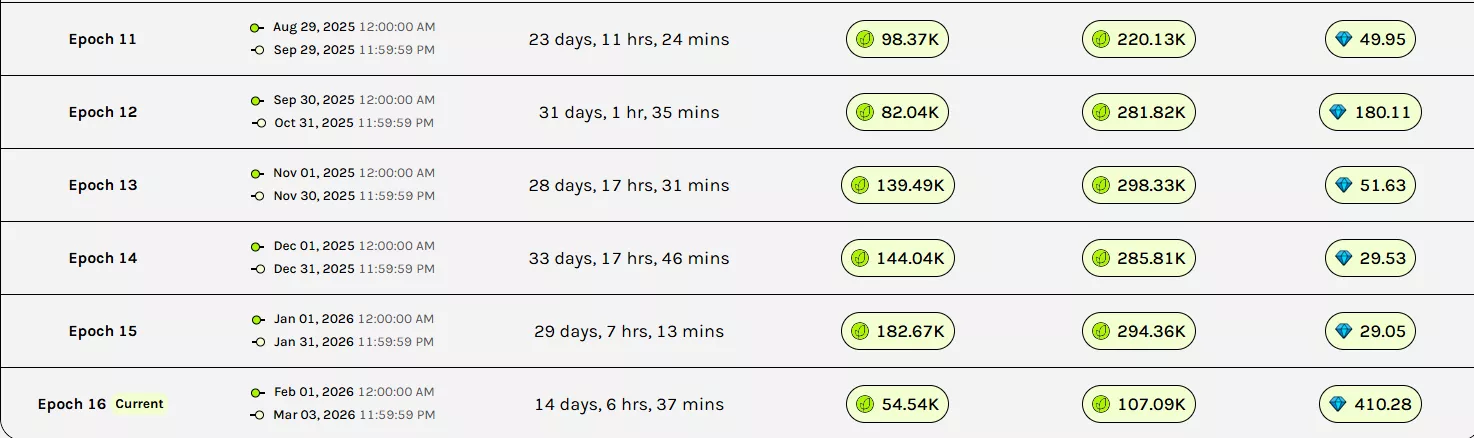
Time vs Reward: Is $GRASS Worth It?
Here’s the honest deal: Uptime Points feel like a steady drip. Diamonds (Network Points) feel like “you got selected today” moments. If you’re trying to be eligible for future seasons, diamonds matter because they show real usage, not just being online.
Our realistic time budget
- Setup: ~5–10 minutes (signup, install, connect, basic settings)
- Daily: ~30 seconds (quick dashboard check)
- Weekly: ~2–5 minutes (update app/extension, sanity check device sleep + network stability)
What “good” looks like (without promising numbers)
- If your device is online all day on stable internet, you’re maximizing eligibility.
- Diamonds depend on demand (your region matters) and reliability (your connection quality matters).
- If your bandwidth isn’t used on a given day, you can end that day with 0 diamonds. That’s normal.
How to get more Diamond Points (the legit way)
Diamonds come from active usage, so your goal is simple: be the connection Grass wants to pick.
- Keep uptime near-max. No uptime = no chance to be used.
- Stabilize your connection. Use reliable Wi-Fi (or wired ethernet if you can). Fewer drops helps.
- Stop your device from sleeping. If the app/extension pauses, your “available bandwidth” disappears.
- Use the most stable client you can. Grass supports different ways to connect (extension, desktop/mobile app, and dedicated hardware options in some regions). In general, always-on setups tend to stay eligible longer.
- Avoid VPNs/proxies while running Grass. They can make your connection look “less normal,” which may reduce usage chances.
- Watch data caps. Diamonds mean traffic. If you’re capped, you may need to limit or skip.
- Referrals help—but mostly on the Uptime side. Referrals can boost your overall points and tier progress. They don’t directly “force” diamonds, but they can still help your overall standing.
Risks & Things to Watch
- Fake apps and fake extensions: Only install from official Grass pages. “Diamond boosters” are usually scams.
- Account safety: Don’t buy/sell accounts. Don’t share login codes. Use strong passwords.
- Data usage: Diamonds mean active traffic. If you’re on limited data, this can get expensive fast.
- ISP/work/school rules: Don’t run Grass on a network you don’t control (office, school, public Wi-Fi).
- Device heat/battery: Always-on devices can warm up. Phones can drain faster in the background.
- Rewards are not guaranteed: Future distributions, point weight, and eligibility rules can change. DYOR.
Step-by-Step Guide: How to Join Grass
Start earning Grass Points (Uptime + Diamonds)
If you want to try Grass, you can register here. Once you’re in, focus on stability + uptime to improve your odds of getting Diamond Points (Network Points).
Referral disclosure: If you sign up using our link, The AirdropBuzz Team may receive referral credit from Grass at no extra cost to you.
FAQ
What are Grass Diamond Points?
Grass Diamond Points are commonly how users describe Network Points. You earn them when Grass actively uses your bandwidth for real web data requests, not just when you’re connected.
Why am I getting Uptime Points but zero diamonds?
Because diamonds depend on demand and selection. Your connection might be online (uptime) but not chosen for active traffic that day. Keep your setup stable and always-on to improve your odds.
Do referrals increase Diamond Points?
Referrals mainly help with Uptime-side rewards and your overall progress. They don’t directly force diamond traffic to your connection, but they can still boost your overall points and ranking.
Is there a guaranteed way to farm more diamonds?
No. Anyone promising guaranteed diamonds is likely selling a scam. What you can do is maximize eligibility: stable internet, high uptime, no VPN, and a device that stays online.
Where do I see my diamonds in Grass?
Open the Grass app/dashboard and go to the Rewards area. You should see a breakdown of Uptime Points and Network Points (often displayed as diamonds).
Direct link to official project page
Get curated airdrop updates
Weekly AirdropBuzz highlights, safety notes, and top picks-no spam.
Explore Airdrop Lists
Community Discussion & Rating
Leave a Comment & Rate
No comments yet. Be the first to share your thoughts!