DataHive AI Airdrop Review: Passive DePIN Points for AI Data
Eligibility checklist, task flow, and safe-link verification for this campaign.
Install "Listen to Article" to read this page out loud in Chrome.
Prefer not to install? Use your browser's built-in Read Aloud if available.
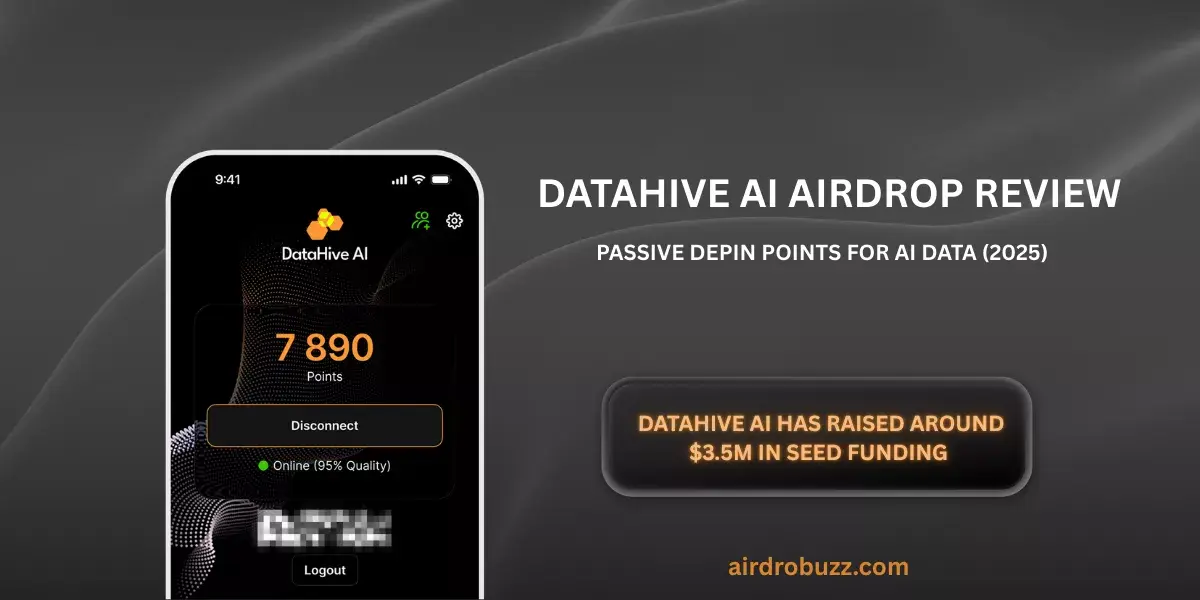
DataHive AI is a DePIN-style data network that turns your regular browsing and phone usage into points that should later convert into tokens. With $3.5M in seed funding from tier-one crypto VCs and a confirmed point-to-token rewards model, it’s one of the more serious “farm with a browser extension” plays right now. This review breaks down what DataHive AI is, how the airdrop works, and whether it’s worth your time.
This airdrop guide was reviewed by the AirdropBuzz research team, who have completed dozens of Solana and DeFi airdrops.

I'm Dhiraj Dixit, founder of AirdropBuzz. I personally research and complete airdrops before publishing these guides.
Airdrop quick facts
What does this score mean? See the scoring methodology.
Step-by-Step Carousel
Swipe through steps quickly: Step 1, Step 2, Step 3 and more.
- Chain: DePIN / AI data network (VC-backed)
- Cost: $0 (Free; optional mobile data)
- Time: ~15 minutes setup, then passive
- Difficulty: Easy (extension + Android app)
| Time Required | Cost | Risk Level | Our Verdict |
|---|---|---|---|
| ~15 minutes to set up; fully passive after | $0 (no deposit; potential bandwidth/data trade-off) | Medium–Low (data sharing + extension) | Worth it for passive farmers and DePIN hunters; strong upside signals if token launches cleanly. |
What Is DataHive AI?
DataHive AI is a decentralized data network that supplies high-quality, ethically sourced training data for modern AI models. Instead of operating a centralized web scraper farm, the team uses thousands of user devices running a Chrome extension and Android app to collect, clean, and label web data. This distributed design can capture dynamic content that legacy crawlers struggle with—think infinite scroll, JavaScript-heavy frontends, and platform-locked pages that require an active session.
The project positions itself firmly in the DePIN (Decentralized Physical Infrastructure Network) category: users contribute real-world infrastructure (their devices and bandwidth) and earn points in return. DataHive AI has raised around $3.5M in seed funding (Source - Gate.io) led by 6th Man Ventures with participation from Solana Ventures, Side Door, Wave GP, Nural, Race, Curved Ventures and well-known angels, giving it more credibility than many “farm-with-an-extension” clones.
On the demand side, AI labs and enterprises can purchase ready-to-train datasets across text, image, video, and other multimodal formats. The promise: better coverage of the real web at lower cost than traditional centralized scraping operations.
Our Experience Joining DataHive AI

I installed the DataHive extension on my Chrome browser (version 131) on Dec 9, 2025. The signup with Google took under two minutes, and the extension started running in the background as soon as I hit “Allow”. No wallet connect, no KYC, just a simple web2-style onboarding.
Compared to other DePIN node projects I’ve tested recently like Grass and Nodepay, the setup felt smoother and less “experimental”. There were no weird redirects, broken captchas, or mystery permission prompts – just install, log in, and start earning points.
My observations
- Resource usage: I kept Task Manager open for around 30 minutes after installation. The DataHive extension stayed under 50 MB of RAM and barely touched CPU. I could stream YouTube in 1080p and scroll X (Twitter) without any stutter, so the performance impact felt negligible.
- Mobile sync: I also installed the Android app on the same day. Logging in with the same account synced instantly, and the dashboard showed two active devices almost immediately. My point rate clearly increased once both desktop and phone were online.
- Overall polish: The dashboard feels more like a polished SaaS product than a buggy crypto alpha tool. The point counter updated reliably, the referral page clearly showed my tiers and link, and I didn’t need a guide to figure out what to click next.
Based on this first session, DataHive behaves like a low-maintenance, set-and-forget DePIN client: quick to install, light on resources, and easy to monitor from a single unified dashboard.
Time vs Reward: Is the Future DataHive Token Worth Your Time?
DataHive AI uses a familiar DePIN playbook: early contributors earn “points” that will later convert into tokens at TGE. Over 642 million points have already been distributed to extension and app users, which tells us this is not a tiny test cohort anymore.
Right now, there is no public token ticker, supply, or exact airdrop allocation. All we know is that contributors will receive rewards through point-to-token conversion, with performance heavily tied to uptime, device count, and referrals. That uncertainty cuts both ways:
- Upside: Serious VC backing, a real AI-data use case, and a clear DePIN narrative give this a shot at becoming a major data infra token if and when it launches.
- Downside: No tokenomics → you’re blind on dilution, vesting, and how much of the network will actually go to farmers.
Given the passive nature (once installed) and zero capital requirement, our verdict in the table stands: for people already farming DePIN and willing to share anonymized browsing data, DataHive is a solid risk–reward bet. If you’re ultra-strict on privacy or hate installing extensions, this is probably not your play.
Risks & Things to Watch
DataHive runs as a browser extension and background mobile app, which always introduces some security and privacy surface area. According to their materials, the platform focuses on public web data and anonymized fragments rather than personal identifiers or credentials, and does not claim access to sensitive information like passwords.
Still, best practices apply:
- Install only from the official Chrome Web Store and Google Play pages.
- Use a separate browser profile or secondary device if you’re cautious.
- Regularly review and revoke any OAuth / Google permissions you’re no longer comfortable with.
- Monitor app updates and community feedback in case permissions change over time.
This is not financial advice. Treat DataHive like any other pre-token DePIN farm: size your time and data exposure accordingly and always DYOR.
Step-by-Step Guide: How to Join the DataHive AI Airdrop
Ready to farm the DataHive AI airdrop?
Install the Chrome extension and Android app, then let your devices earn points in the background for the future token drop.
Join DataHive AI via AirdropBuzzNo deposit required. You’ll be sharing anonymized public web data via browser and mobile app. This is not financial advice; always do your own research before installing any extension or airdrop tool.
FAQ: DataHive AI Airdrop
Is the DataHive AI airdrop confirmed?
Yes, DataHive AI has publicly committed to rewarding early contributors via a point-to-token conversion model. You currently earn “Data Points” for running the extension and Android app, plus extra points from referrals and social tasks. The exact token ticker and conversion rate, however, have not been announced yet, so final rewards remain uncertain.
What is the total airdrop allocation?
The team has not disclosed how much of the eventual token supply will be reserved for point holders. All guidance so far is that rewards will be proportional to your contribution (uptime, devices, referrals, and future labeling work). Treat the airdrop as speculative until full tokenomics are published.
Does DataHive AI have a whitelist or waitlist?
No. At the time of writing, both the Chrome extension and Android app are open to anyone. You can register with email/Google and start earning points immediately without a whitelist or approval process.
When will the DataHive token launch?
The Token Generation Event (TGE) date hasn’t been announced. Looking at similar DePIN projects, it’s reasonable to expect several months of point farming before any token goes live, but that’s only an educated guess – timelines can change and there is no guarantee of a specific launch window.
How do I track my DataHive points and referrals?
Open the DataHive extension or visit the web dashboard. Your current point balance, uptime stats, and referral tree (with L1–L3 breakdown) are shown there. The Android app exposes a similar dashboard so you can monitor earnings from your phone as well.
Can I use DataHive AI on iOS?
Right now, the official mobile app is available on Android via Google Play. An iOS version has not been announced. If you’re on iPhone, the only way to participate is via the Chrome (or Chromium-based) browser extension on desktop or laptop.
What data does the extension collect?
DataHive focuses on publicly accessible web content (text, images, videos, product data, etc.) and claims to collect only small, anonymized fragments designed for AI training. An optional authenticated mode for logged-in pages is planned for higher rewards. As always, you should read the latest privacy policy and only opt in if you’re comfortable with the data sharing model.
Is DataHive AI safe to use?
No extension or DePIN client is zero-risk. On the positive side, DataHive is listed on official stores, has reputable investors, and publicly emphasizes privacy and security. On the other hand, you’re still installing third-party code that interacts with your browsing environment. Use separate profiles/devices if you’re cautious, and never treat passive airdrops as risk-free.
Direct link to official project page
Get curated airdrop updates
Weekly AirdropBuzz highlights, safety notes, and top picks-no spam.
Explore Airdrop Lists
Community Discussion & Rating
Leave a Comment & Rate
No comments yet. Be the first to share your thoughts!